
Before you replace the website your customers already use
Keep the old links that still bring people through the door. Here’s what to check before, during and after a redesign.
Picture a customer walking down Kerr Street in Oakville. A friend has texted her a salon’s colour-services page. She taps the link, sees the price of a consultation and books. The person approving the new website may never have opened that particular page, yet it did the whole job.
An established website has dozens of entrances like this. Before approving a redesign, identify the paths that matter and decide how each will work on launch day. These are the checks we would ask a web designer to walk through.
Make a list of the entrances people actually use
Export the pages that get clicks in Google Search Console. Add the pages visitors first land on from your analytics, if available, and the addresses in your current sitemap. Then check the places a report can miss. Open your Google Maps listing, Instagram bio, email signature and the QR code printed on your counter cards.
For each address, record where you found it, why someone visits and the action they should be able to take. Include downloadable menus, price lists and booking links. Save a copy of your current site and note a recent baseline for search clicks, completed bookings and enquiries so you have something to compare after launch.
Give each old address a destination
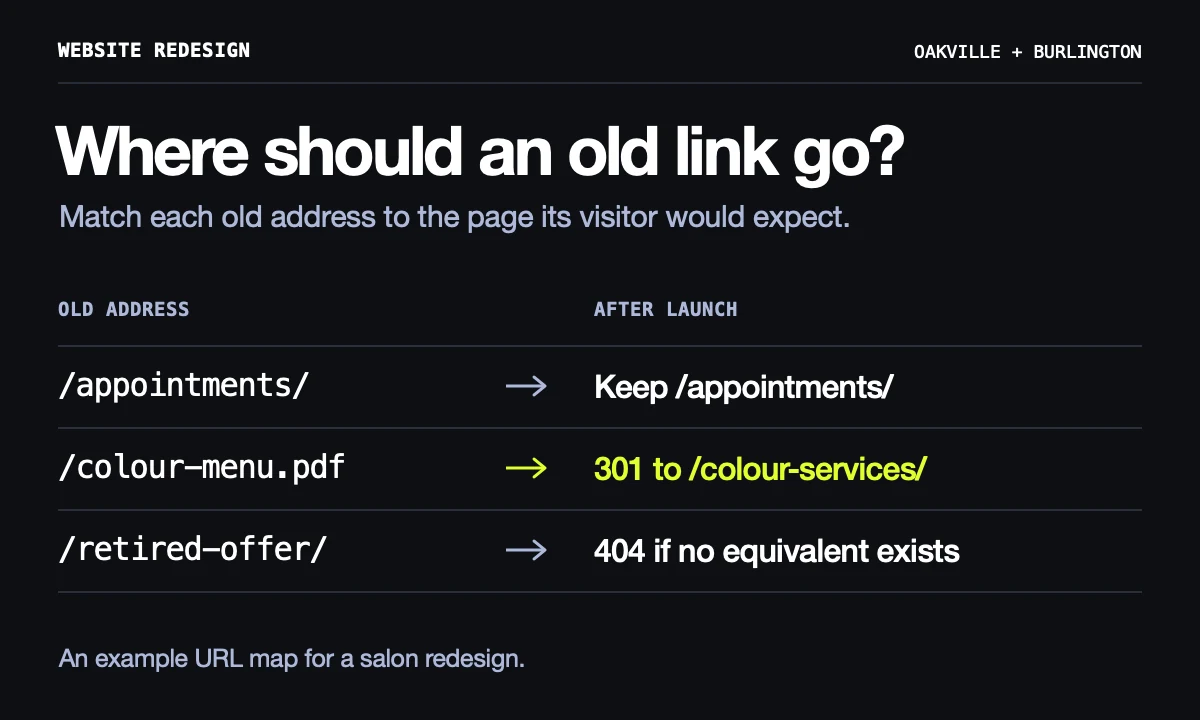
Keep familiar page addresses when the service stays the same. A new layout can go live at the existing address. If you change one, ask your designer to set up a permanent redirect, usually a 301, straight from the old address to its closest equivalent. If a service is gone and there’s no suitable replacement, return a proper page-not-found response with helpful navigation.
For example, imagine that a Kerr Village salon is moving its old colour-menu PDF onto a web page. A postcard QR code points directly to that PDF. Redirect the exact file address to the new colour-services page, then scan a printed card. Someone should land on the service they were promised, see the current information and be able to book.
Rehearse a real enquiry before you switch
Consider a downtown Burlington shop that takes private fitting appointments. Have one staff member use a phone outside the shop’s Wi-Fi and another monitor the inbox or booking calendar. Start from the link a customer would receive and follow the whole journey.
- Open the appointment link. Check that it shows the right location, service and available times. Use an agreed test slot, verify the confirmation, then release it.
- Send an enquiry with a distinctive subject. Confirm it reaches the intended staff member and that pressing Reply addresses the customer. A thank-you screen alone cannot establish delivery.
- Tap the phone number, check the entrance details and open directions. For a downtown business, verify that any parking instructions still match the entrance customers actually use.
On launch day, start outside the new homepage
Visit the public Google Business Profile and test the Website button and any separate booking, menu or order link. These can point to different destinations. Update the links you control and ask directory owners to change important listings. Keep redirects for links you cannot edit. Google recommends retaining redirects for at least a year in most site moves.
Ask your designer to confirm the public pages can be indexed, that their canonical URLs use the live domain and that the new sitemap contains the final addresses. Check your priority pages in Search Console. Over the next few weeks compare search clicks and enquiries with your baseline, focusing first on any particular page that has dropped. If clicks hold steady while enquiries disappear, repeat the form and booking tests before rewriting the page.
Get the Done48 website launch checklist